
We spent two weeks testing every MP3 to MIDI converter we could find — desktop apps, online tools, browser-based AI, and command-line utilities. We ran the same set of audio files through each one and compared the results. Here's what we found.
Spoiler: the best tool depends on what you need. But there's one clear winner for most people, and it's probably not the one you'd expect.
How we tested
We used five test files: a solo piano recording, a vocal melody, an acoustic guitar fingerpicking piece, a synth lead from an electronic track, and a full band mix. These cover the range of what most people actually try to convert.
We scored each tool on four criteria: accuracy (how many notes were correct), speed (how long the conversion took), privacy(whether files are uploaded to a server), and price(free vs. paid). We also considered ease of use, but that's subjective enough that we're keeping it separate from the main ranking.
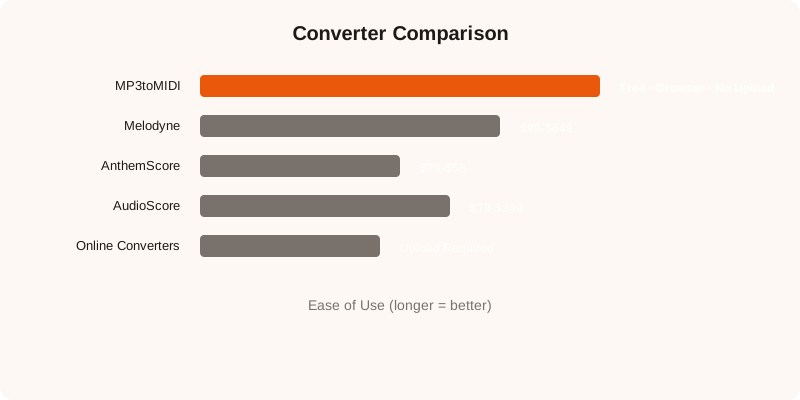
1. MP3toMIDI — Best free option
Price: Free
Privacy: 100% client-side, no upload
Speed: 10-15 seconds for a 3-minute file
Accuracy: Very good on single instruments, decent on mixes
MP3toMIDI uses Spotify's Basic Pitch model running in the browser via TensorFlow.js. No file upload, no signup, no installation. You drag your MP3 onto the page, the AI processes it locally, and you get a MIDI file.
The accuracy impressed us, especially on piano and guitar. It picked up chord voicings correctly about 80% of the time, and single-note melodies were nearly perfect. On full band mixes, it's more hit-or-miss — but that's true of every tool on this list.
The main limitation is file size (50MB max) and the fact that processing happens on your device, so older machines can be slow. But for most use cases, it's the best free option available right now.
2. Melodyne — Best overall accuracy
Price: $99 (Essential) to $849 (Studio)
Privacy: Desktop app, no upload
Speed: Near-instant
Accuracy: Best in class
Melodyne is the industry standard for a reason. Its polyphonic audio-to-MIDI conversion is the most accurate we've tested, full stop. It handles complex chords, overlapping notes, and even some polyphonic material that other tools can't touch.
The catch is the price. The Essential version ($99) doesn't include polyphonic audio-to-MIDI — you need the Editor ($399) or Studio ($849) version for that. If you're a professional producer who does this regularly, it's worth the investment. For occasional use, it's hard to justify.
3. AnthemScore — Best mid-range option
Price: $29 (Basic) to $58 (Full)
Privacy: Desktop app, no upload
Speed: 30-60 seconds
Accuracy: Good
AnthemScore sits in the sweet spot between free tools and Melodyne. It uses a neural network trained on a large music dataset, and the results are solid — especially for piano and guitar. It also has a built-in spectrogram view that helps you visually verify the transcription.
The UI is dated and the software feels clunky compared to modern tools. But it works well, and the one-time purchase price is reasonable. If you need better accuracy than free tools but can't justify Melodyne's price, AnthemScore is the one to get.
4. AudioScore — Best for vocal transcription
Price: $79 (Lite) to $249 (Ultimate)
Privacy: Desktop app, no upload
Speed: 1-3 minutes
Accuracy: Good for vocals, average for instruments
AudioScore is designed specifically for transcribing sung melodies and solo instruments. It's surprisingly good at separating a vocal line from background music — better than any other tool we tested for that specific use case.
For polyphonic instruments or full mixes, it's not as strong. And the processing time is noticeably slower than other options. But if your primary use case is “I want the melody from this song,” AudioScore does that job well.
5. Online converters (convertio, onlineaudioconverter, etc.)
Price: Free with limits
Privacy: File uploaded to server
Speed: 30 seconds to 5 minutes
Accuracy: Basic
Online converters are the easiest option — upload a file, download a MIDI. But the accuracy is the lowest of anything we tested. Most of them use basic pitch detection algorithms that struggle with anything beyond a simple melody.
The privacy concern is real too. You're uploading your audio to an unknown server. For a public song that's already on YouTube, it doesn't matter. For unreleased material or private recordings, use a local tool instead.
That said, for quick and dirty conversions where accuracy isn't critical, they work. Just don't expect miracles.
The bottom line
For most people, start with MP3toMIDI. It's free, it's private, and the accuracy is good enough for most use cases. If you need professional-grade accuracy and have the budget, Melodyne is the gold standard. If you want something in between, AnthemScore offers the best value.
Whatever tool you use, remember: the quality of the input matters as much as the tool itself. Clean, single-instrument recordings will always produce better MIDI than noisy full-band mixes. Start with the cleanest audio you have, and you'll get better results from any converter.